Twitter
RSS
Showing posts with label Keyword Tools. Show all posts

KeywordSpy 20% Discount - Promo Code Extended!!!

1
Good GREAT NEWS!!!!

KeywordSpy is offering their accounts with a 20% discount on the first month of your subscription for any of the KeywordSpy packages (Research, Tracking, or Professional).

Promo Code: KSHxqHvoKR

The promo code is only valid from February 1 - 7, 2010 EXTENDED until February 16, 2010!!!

Just key in the promo code when you sign up for any KeywordSpy package.

Hurry! Give your website promotion a competitive edge with this powerful keyword research tool today!

Affiliate Marketing: Finding Negative Keywords for Wrong Matches

0
Unwanted clicks with minimal or even zero conversion often stem out from irrelevant ads for products showing up for unrelated searches. This happens when your PPC ad campaigns may be triggering broad match or even phrase match keywords that also lead to unwanted visibility.

When you want to widen your reach on your niche without risking the unwanted clicks, you can also indicate Negative Keywords to your campaign. These are keywords you absolutely do not want your ads to show for in the search engines. Doing this for broad match and phrase match keywords can give you further control over your clicks.


If you have included broad and phrase match keywords within your campaign and do not know where to start with negative keywords, try keyword research tools that provide keyword data on websites and affiliates. KeywordSpy, for example, gather keyword information by scouring the web with keywords and getting rankings and ad data from the public results, along with providing useful metrics of their own.

When you have ran your campaign a respectable period of time, try looking up your affiliate ID, or domain name in the system. This would reveal the keywords that you are advertising on, how useful they are within your niche, and other keywords that also trigger your ads.


Results can also show keywords that may be triggering your ads and generating unwanted clicks because of broad and phrase match keywords in your campaign.

(Google Adwords Campaign Keyword Setup)

If you find keywords you are not originally aiming for and does not relate to your products at all, trim them down and integrate them in your Negative Keywords list. With this, you will increase the chances of unwanted clicks that do not convert into sales and built up on your campaign costs.

KeywordSpy Tracking Series Part 5: The Power of Suggestion

0
At last I've come to the last part of the series on KeywordSpy Tracking 2.0. And this is where we'll talk about the Tracking Suggestions Tab.

Never underestimate the power of suggestion. When it comes to PPC and SEO campaigns, good keywords are hard to come by, and when you do happen to come across profitable keywords, it’s hard to tell how long before it becomes less marketable. With monitoring your keywords search engine performance comes also the tasks of keeping your eye open for new or better terms that could also do your campaign good.

When you’re monitoring your campaign’s keywords in the Tracking system, whether for PPC or SEO, your selection of keywords will also let the system provide related terms and phrases with your own set list. You can view this by proceeding directly to the Suggestions tab.


While you are tracking down your keywords’ performance, looking into prospective new keywords is also ideal. The market comes up with new keywords everyday. From new products and technologies to special occasions and events, there are great opportunities that would attract further business to a website. New keywords that appeal to visitors that could also generate high amounts of clicks at possibly lesser costs are worth studying.


When you find yourself stuck with ineffective but expensive keywords, of course, there may be keywords your competitors are already using with far lesser costs per click but still has acceptable click value. The same goes for organic keywords. You can compare these keywords with your own and possibly find more profitable keywords than the costly ones you are advertising on. Simply check out the additional keywords of a competitor or compare your domain with a competitor of your choice and check out their unique keywords.

Always remember that the internet is constantly changing not just with more and more information but business opportunities as well. So if you want to stay in the game, start tracking, be informed, and keep sprucing up your campaign.


Tracking Series Part 1: What Your Keywords Are Telling You
Tracking Series Part 2: Watching the Competition
Tracking Series Part 3: Watching Out For the Bigger Picture
Tracking Series Part 4: Comparing Keywords of 2 Domains
Click here for more details on KeywordSpy Tracking 2.0

KeywordSpy Tracking Series Part 4: Comparing Keywords of 2 Domains

0
On this third part of our series on KeywordSpy Tracking, we’ll venture into one of the new feature of the system which is the Comparison Tab.

The Comparison Tab allows you to bring two domain’s keyword list in side by side with each other for an organized and efficient comparison of keyword data. For this you can select any two domains on the competitors tab and hit the “compare” option or you can directly proceed to Comparison tab and select domains from there.


One great benefit of this feature is it speeds up the process of taking keyword list after keyword list of your competitors and sorting out which keywords they have and do not have in comparison to yours. You can immediately tell which keywords their ads are showing for that your campaign is missing out on.

New advertisers come in and out the online advertising field daily. Comparing keywords will also allow you to find out if certain advertisers are also worth studying or after a different market altogether.

If you’re trying out new keywords for a specific type of campaign, keeping a close eye on what your competitor is doing could be good. Whether you’re avoiding using the same keywords or researching for currently profitable keywords working for the other advertiser.

This function can also be useful in terms of organic keywords. As much power PPC advertising has, one should never forget not to rule out SEO process, you could be paying for keywords your competitors are using when you can easily and cost effectively implement them in your SEO campaign.


Click here for Part 3 of this series: Watching out For The Bigger Picture
Click here for Part 2 of this series: Watching the Competition
Click here for Part 1 of this series: What Your Keywords Are Telling You
Click here for more details on KeywordSpy Tracking 2.0


Technorati Profile

Tracking Series Part 3: Watching Out For the Bigger Picture

0
The significant change in the KeywordSpy Tracking system is the way it tracks down data. The older version, as most probably know by now, tracks down both keywords and domains while the Tracking 2.0 mainly focuses on tracking down keywords. What about my domain and the competitors I’m tracking? Don’t worry, it doesn’t end there.

Initial results for monitored keywords not only show average clicks and cost data for each. Remember, you can also view PPC and Organic listing results with each keyword. That means finding out websites advertising or using these keywords on daily basis. Here comes the bigger picture, instead of just tracking down specific domains like before, the system actually allows you to track down all, if not, more domains.


Each keyword result for a campaign generates, at the same time, competitors bidding on or utilizing that keyword. And each competitor contains its own set list of PPC and organic keywords to further dissect. Depending on the industry, this means casting a bigger net in terms of information gathering at a more efficient way.

Given that the marketing medium on the internet is in a constant and rapid flux, key information on competition: ranking advertisers; new advertisers; threats in the market; new keywords; and bid and click values are all crucial in maintaining a stable campaign.

There is data gathering and there is focusing on specific variables. If you do want to narrow down a campaign without limiting your search, the Watchlist will cover the job of separating your selected domains, even yours, apart from the rest.


The Watchlist acts as a shortcut to all the data within your campaign. By adding domains in your watchlist, you can concentrate further on key competitors in your industry, including easily monitoring your own results. You can also do this with important keywords in your monitoring campaign. When you log back in, accessing data you want is as easy as clicking through your watchlist.

Data gathering in terms of PPC and SEO keywords takes time and a lot of work to obtain as much credible and useful information as possible. This system hopes to provide effectiveness of research and work efficiency for better a campaign.


Click here for Part 2 of this series: Watching the Competition
Click here for Part 1 of this series: What Your Keywords Are Telling You
Click here for more details on KeywordSpy Tracking 2.0

KeywordSpy Tracking Series Part 2: Watching the Competition

0
On this second part of our series, we’ll be digging deep into the KeywordSpy Tracking module by looking further into advertisers on the Competitors Tab. This feature summarizes the domains bidding on the keywords currently being monitored for a campaign.

Right off the bat, the Overview function gives you a quick glance at the competition level for your campaign group. Of course, it is important to remember that these domains are all based on the keywords you are tracking. So ensuring you are monitoring the right type and amount of keywords will better the results.


The Top Competitors ranks the domains according to percentage of Coverage. In this case, these are the top advertisers bidding on Google Adwords. Depending on the countries you have selected for this campaign, this could also include Top Competitors on Yahoo! and MSN advertising systems. If you are also advertising considerably on your monitored keywords, you should see your domain on this list. You’ll be able to visually compare your rankings to other domains and see where you stand. Are you one of the gray dots lost in the crowd, or hanging out with the cool guys up top?


Aside from advertisers, the Competitors tab also lists the number of indexed keywords and ads for these domains that you can study further. With a saturated market such as this one, you can concentrate on a few competitors by filtering out the data as you please to show results you would like to focus on like showing domains with a few thousand keywords only or more. As discussed on the previous post of this series, you can also get a list of competitors for each keyword in your campaign by clicking on the keywords in the Keywords Tab. To understand a particular advertiser, simply click on their domain on the list.


If you are an advertiser monitoring the effectiveness of your campaign, knowing your effective keywords through average position is important. Over here we have top keywords for the advertiser justflowers.com. Though these are top keywords, we can see that much improvement is necessary as ads for these keywords are not getting much visibility. That’s a good place to start.

If this is your competitor, you can also determine where you stand in comparison to this or any other domain with respect to average Ad Position. But of course, further analysis on this competitor’s keywords would also help with your campaign.


The keywords for an advertiser, be it you or the competition, will show you the effectiveness or ineffectiveness of a campaign. If a keyword is generating too low a position for ads, conversions could be less and the probable reason is there are not enough competitive bids for that keyword. If your bid for a keyword is significantly lower than its average CPC, your ads might go to the bottom of the barrel and you might as well waste money for that keyword.


The premise of following the lead of your worthy competitors is to take their already proven strategies and find out how it works for your website. When it comes to ad variations, one of the closest things you can get is to see how long their ads have been working for them. If you’re looking at months old data, trying to figure out how long an ad has been showing for a keyword, there is one little problem: sure that ad has been effective back then when the data was collected, but the bigger question is, is it still effective right now? That is why real-time monitoring of ads and their landing page data comes in handy. You have to be able to track effective ads soon enough to follow before the trail gets cold.


Lastly, monitoring is all about keeping things in check. If you are looking at your own domain, there may be keywords that your ads are also showing for or if you are analyzing the competition, keywords that you have missed or new keywords entering in the market, its best to check if these terms are worth studying, monitoring, and advertising on in the future.


Click here for Part 1 of this series: What Your Keywords Are Telling You
Click here for more details on KeywordSpy Tracking 2.0

KeywordSpy Tracking Series Part 1: What Your Keywords Are Telling You

0
Every search marketing project comes with the grueling task of research for current and useful data as well as monitoring of keyword effectiveness and competiveness for a given campaign. The KeywordSpy Tracking program is a brilliant way to track down keywords and competitors but not a lot of people know how it works. On this series,THAT is the challenge.

On the first part of this series, we’ll discuss the results of the tracking program, particularly the Keywords Tab. After you have created your campaign and entered the keywords you wish to track over your target countries (and search engines), the program will show keyword data based on that particular campaign.


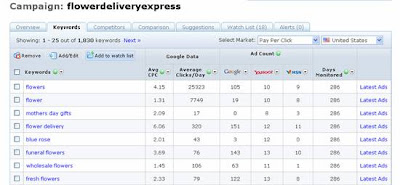
A result on your keywords means the average daily Cost per Click and Clicks per Day on those keywords. With this table alone, you’ll be able to see the competition level that surrounds each and every keyword you are monitoring as you’ll be able to see how many ads are currently showing for each search engine. This data is manageable with a useful filter option on each column should you decide to concentrate on a particular group or data within a certain category or value.

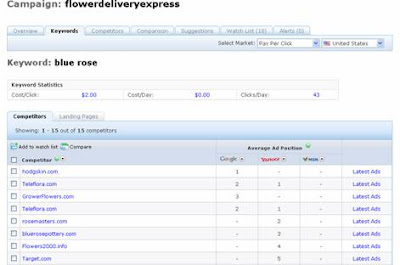
A low cost per click value with a reasonable amount of competition and daily clicks is an ideal keyword to use and maintain for a PPC campaign. More than that, competition also varies depending on the search engine. On the example above, there are about 12 advertisers for the keyword “blue rose” on Yahoo, a relatively high competition environment. But there is fair game for this keyword on both Google and even MSN, and with a cost of $2.01 for an average of 43 clicks a day, this comes as a good advertising opportunity.


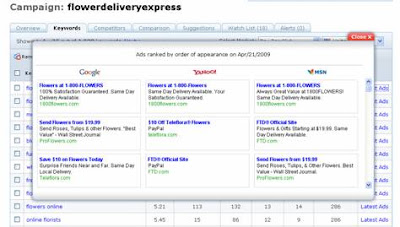
Each keyword has ad ranking on search engines. A quick look at the ads will give you an overview of working ads for a given keyword. If you are also bidding on this keyword, this is also a quick way to find out where you are visually compared to the rest of the advertiser’s ads. Go through the Latest Ads for each keyword and you’ll also be able to tell the dominating advertiser for the most part of your campaign.


Another way at looking at this concept is finding where each advertiser stands with each keyword and ad if you select one of the keywords. Monitoring at this scale allows you to not only pay close attention to your advertisers but also find out other ranking advertisers worthy as competition for your keywords. We have three competing domains for the keyword “blue rose”. If you are looking to advertise on this search engine, these are the three domains you could study further for strategies.

So far, we’ve learned that keyword monitoring will help you analyze daily market values for keywords in your campaign as well as familiarizing yourself with the current competition environment and opportunities surrounding a given keyword. On the next part of the series, we’ll be able to go deep on these competitive fields as we take a look at these advertisers on the Competitor level.


Click here for more details on KeywordSpy Tracking 2.0

Seasonal PPC Advertising: Picking Your Battles

1

If you’re selling a particular product that only generates a high amount of income during certain times of the year, have you ever considered Seasonal Advertising? Having an idea of when the buying trend would go up can be of a significant advantage to your business. If you do not have enough budget for a long term advertising investment in Google Adwords or you want to cash in on the special days of the year, seasonal marketing might just be the best thing you could do for your business.

Seasonal advertising only focuses on certain periods in a given year for all out advertising efforts, taking advantage of special occasions such as the Christmas season, Valentines, the Superbowl, wedding seasons, and the like. If you are a seller of merchandise that could benefit from special events such as these then you might just want to invest on the trend when the demand is in full bloom.

If done right, not only will you reap in the benefits of a demanding market. You can also save on advertising measures. This may also do you better than shelling out cash to promote your product the entire year round.

With your product in high demand, you can start with keywords that relate best to the occasion and the product. That way your business would not be so hard to find when it is needed. Show the best Christmas gifts, valentine flower bouquets and diamond wedding rings when they are wanted and experience increase in your market share.

You can also get great ideas from the competition. There are a lot of competitive keyword tools online that can gather keywords from marketers in the same field so you can get good ideas on the terms to work with. KeywordSpy's Time Machine feature allows you to look at keywords other advertisers have used in the past months, so I suggest giving that a shot. You can go back for months worth of information. Accessing terms and phrases other businesses of the same field have used and see if they'll be effective next season.

Take time formulating your ad copies. Generate immediate connection with your target market by creating attractive "buy lines". If you offer special discounts, include that in your copy to increase consumer's buying impulse.

Lastly, if you are only advertising on certain periods of the year. Don’t be afraid to invest a little more. Unless you are the only one in your area producing and selling a certain type of merchandise then expect other businesses that will also take advantage of the demand during its peak season.


SEO vs PPC: Breakdown of Possibilities

0

The two most popular online marketing techniques by far is Search Engine Optimization and pay Per Click Marketing. There are proper ways to do both but I will be handing down in detail which technique works for a website.

TYPICAL USERS. Typical users of SEO are new and small businesses with a bit of a tight-budget. SEO can be pretty cheap as compared to PPC so it works well for smaller websites who just want to get listed. On the other hand other mid-level companies employ PPC as their main online marketing tool. It’s a faster way to reach consumers. It does have a price so only those who are willing enough to shell out cash for the ad space are willing to do this. It can also be noted that generally, the fact that a company uses PPC ads adds a vote of confidence on their part. People perceive that those on paid advertising arena can afford the space because their products are well established. If you have enough cash you can do both SEO and PPC of course, or you can consult an SEO agency do the job for you.

TIME. When we talk internet, we connote it to speed and instant results. But the effects of SEO and Pay Per Click vary. SEO usually means natural ranking. Letting the website speaks for itself. A couple of word-with-links here and there and there would still be a time to wait for search engines to pick of your site's popularity and index it on their site. Visibility in search engines through SEO could take weeks even months.

Pay per Click Marketing works a lot faster than SEO. Pay per Click or PPC is an online advertising means whereby you contract search engines to place and ad for your company whenever a keyword of your choosing will be searched on their site. Placing an ad in this case is as fast as 10 minutes or even less! The visibility of the ad, however, depends on how much you’re willing to pay.

COST. PPC can be pretty costly or cheap depending on the keywords you use and the amount you are willing to bid on to get them placed. The amount of your bid determines the position of the ad. This is one powerful way of beating your YSM or Adwords competitors. The higher - the better the placement.

SEO on the other hand does not have to be too costly. If you are a small business just trying to get the word out on your business, and you’re doing SEO-it-yourself, optimizing your site is pretty easy. Choose a few keywords to work with, write a good copy for your site and a few linkbuilding techniques and you are on your way. Some online directories will require you to pay a price to have your site listed in their sites but if you're on a tight budget, I suggest opting free reciprocal linking with quality directories instead. Remember, I’m talking about DIY SEO. Paying for the service via expert SEO agencies is another matter.

COMPETITORS. Now this is pretty complicated. Competitors vying to get the same top spot just like you means, well, just about everybody! Imagine the internet as gigantic ocean with all sorts of marine animals. If you're just a clownfish looking for your son, then what an adventure that would be, right? But online marketing is no kid's movie. So it’s imperative that you narrow down the competition to reach your target market efficiently. Thank heavens for keywords!

When we're taking about SEO keywords, the number of your competitors depends on the keywords you are focusing on. Focus on ones that describe your business in a specific manner. That way you would be narrowing down your competition and targeting consumers with a specific product/ service in mind. You can use various keyword tools for this. KeywordSpy is what I’m using right now. You can look at organic searches and mine related keywords if you run out of ideas.

The same goes for Pay per Click keywords. The competition is highly dependent on the number of advertisers bidding on the same keywords as you. If you plan on taking on keywords being used by the "sharks" in the industry, I’m talking about those big companies with online history and a big spending limit, better be prepared to get eaten up. So the same principle applies, if you go with specific keywords, you have a better chance of surviving fighting off the same fish instead of the entire ocean.

SPACE. With PPC, the amount of opportunity to showcase your business comes in two or three small lines per ad space. That’s your title, URL, and description. Your ad has to catch the consumer's attention, connect with them and attract them enough to click on your ad. Of course, the more ads the better. You'll have a better opportunity selling your business in different ways.

SEO also has great opportunities for promotion. The number of ways you can influence ranking by creating relevant content is enormous. You can have your entire website as your canvass. You can also promote via linkbuilding, forum and blog participation and more to get your message out there.

So there you have it, a simple breakdown on SEO and PPC advertising. It’s all in a manner of choosing which fits your business. The last tip I could probably provide is of course, when it comes down to it. Your product or service has to be worth all that. I say this all the time. Visibility is one thing, getting the consumers as customers, is all on you.


Pay Per Click Advertising: Make Money with Your Ads

0

Creating a Pay per Click campaign is as fast as 10 minutes. Depending on your bid and the keywords you use, you can reach your targeted audience within seconds. But creating a PPC campaign is not as no-brainer as most people think. It takes great effort in choosing keywords and writing ad copies to really get quality traffic. Not only that, as I’ve mentioned before, traffic is just one thing. The prospect of an actual sale makes all the difference.


So here's a few basic tips on making the most out of your online advertising and increasing your earning capacity through Pay per Click ads.

Regarding Keyword Research: Coming up with keywords that describe your product or service is not enough. Make sure to use the best keyword tools to utilize just the right kind of keywords to make it worth your investment.

Whether Organic SEO or keyword PPC research, the cardinal rule is not to use generic keywords. You can read about this on my previous post. Try to use keywords that pertain specifically to your product or service. People who search for specific items or service on the web has more or less considered what they need and is now looking to buy. No more window shoppers for your site, just quality traffic.

Consider the competition. When it comes to researching keywords, it’s also important to know who else is bidding on it and how many are you up against. Keyword Competitive Tools like the one I’m using now, KeywordSpy, tells you the websites competing for a certain keywords, their average bids, and average clicks they get. Having these data will help you analyze if it would be worth it to get in the game and compete with the rest of the advertisers. Id also like to point out that if there are keywords too pricey for you, you may opt to rank naturally with those keywords via SEO and using them in your website content.

Now, some keywords work great for some but some do not. You'll soon know these keywords as you go along with your campaign. Once you've established which keywords are working for you, separate them and put them in different campaigns along with other related keywords. With this, you can give them a different ad copy and create more traffic possibilities for your website.

Moving on to your Ad Copy, you have selected your keywords and you are now ready to advertise. Don’t just write anything to sell. The consumer has to be able to not just understand your ad but also relate to it. The best way to write an ad copy is asking yourself: What kind of words would attract you and compel you to click on a certain ad when you see them?

A helpful tip is to include the words in your keywords in the title or first line of the ad. At this point, when a consumer sees your ad’s title and finds that what he’s looking for (which is the keyword he typed) is closely related to your title, he’ll be able to associate his need with your ad right away.

Your goal for the description is to attract the consumer and entice him enough to click your ad. Include features of your product / service that could benefit the buyer. If you offer your products at a discounted price for a limited period, add that as your last line to stir up the consumer’s excitement and want to click your ad. Place yourself in the consumer's shoes.

Let’s now zoom in on your Landing Page: I’ve experienced this dozens of times. I go online to look for specific information, search the item on a search engine, click on one of the results, and upon seeing the landing page, I hit the return button on the browser. Why? Because the page didn’t give me the information I needed.

In today's day and age where we want everything fast and easy, there are only a handful of people that will invest their time searching a certain website for the information they needed. Most of the time, some consumers think like me. "Why waste time browsing this site when there are dozens more who are more specific and straight to the point. That’s what you need to get done.

If you've selected keywords to drive traffic to your site, consider the keywords to make an actual sale. Make your landing page relevant to the keywords you have set up. Include the keywords on the content. This is so when the consumer sees the site, they’ll be convinced you got what they're looking for since you are talking about it on the page itself.